How Do I Delete a Pinterest Account?
In today’s privacy-conscious digital world, there are a number of reasons why you might be asking, “How do I delete a Pinterest account?”
For some users, privacy is the main motivation. Pinterest profiles, Pins, and boards can reveal a lot about you, including:
- Event ideas
- Future plans
- Location clues
- Personal interests
- Shopping preferences
Over time, this information can create a detailed picture of a person’s habits and lifestyle. If you’re trying to reduce your digital footprint, limit Pinterest data collection, or protect your personal information, deleting your Pinterest account is a smart step.
Another reason for wanting to remove your Pinterest account is reputation management. Pinterest content often shows up in search engine results, and it can rank quite high for an individual’s name. Controversial saves or out-of-date content that no longer aligns with your image can impact how others perceive you. By deleting your account, you can clean up search results and exercise control over your online identity.
It’s also possible that your Pinterest account has simply gone unused for months or years, and it’s time to get rid of it. Dormant accounts are vulnerable to hacking and unauthorized access. By removing accounts you don’t need, you’ll have better overall online security.
Lastly, if you created a duplicate account by accident, it’s easier to remove the one you don’t need than try to manage multiple profiles. Deleting extra accounts streamlines your online presence and limits your security risks.
In this article, you’ll learn how to delete your Pinterest account so you have one less online profile to worry about.
At Internet Privacy, we offer monitoring and removal of your personal information online so you can better protect your identity. Contact us today at 866-349-0130 to learn more.
Deleting vs. Deactivating Your Pinterest Account
When you want to remove your Pinterest account, you have two options: deleting it or deactivating it.
Deleting Your Pinterest Account Permanently
Deleting your account permanently removes your Pinterest boards and profile from the platform.
- Your public profile is deactivated immediately.
- Your account and personal data will be deleted permanently in 7 days.
- Within those 7 days before deletion, you can change your mind and reactivate your account.
Note that if you have a business account, you’ll want to remove your payment information before deleting it. If you have any outstanding bills, the card you have on file will be charged.
Temporarily Deactivate Your Pinterest Account
Deactivating your account means you pause your Pinterest activity and can reactivate it in the future.
- Your profile and boards won’t be visible while your account is deactivated.
- If you choose to reactivate your account in the future, your profile and boards will be visible again.
- Even while your account is deactivated, your email address and username will be tied to the account.
If you don’t want your email address or username attached to the account while it’s deactivated, you can update either one of them or both in your account settings.
How To Delete a Pinterest Account
Let’s go over each step of the process for deleting a Pinterest account.
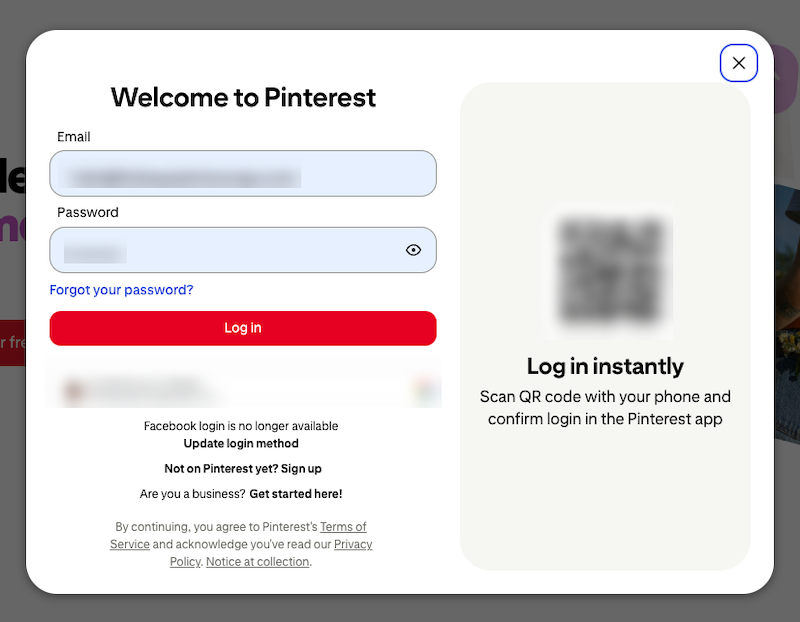
Step 1: Log in to Pinterest
Start by visiting Pinterest online or in the app. Click the Log In button.
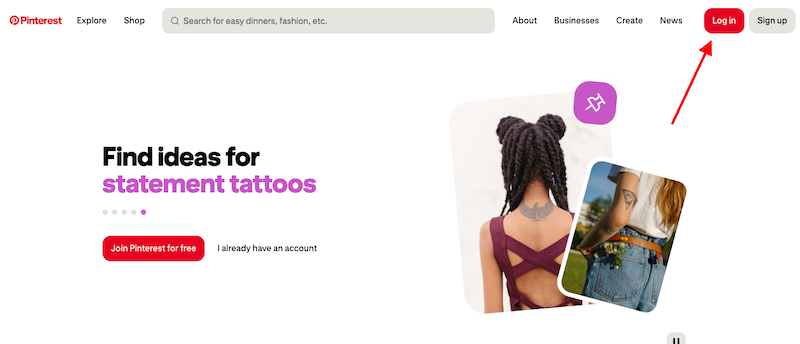
After entering your credentials, click Log In again.
Step 2: Go to your account management settings
If you’re on a desktop, click the Settings and Support icon (the gear) at the bottom of the left-hand sidebar. From the menu that shows up, click Settings.
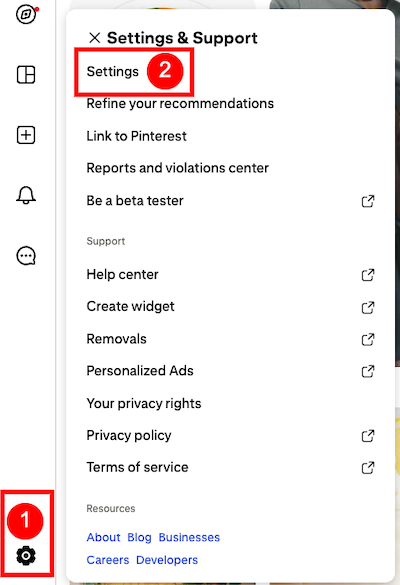
If You’re Using a Mobile Device: Click your Profile Icon on the bottom right, then click your profile photo again on the top left corner of the next screen.
If You’re Using a Business Pinterest Account: You’ll go straight to the Business Hub after logging in. Click the Down Arrow on the top right of the page (directly to the right of your profile picture). Select Settings from the menu.
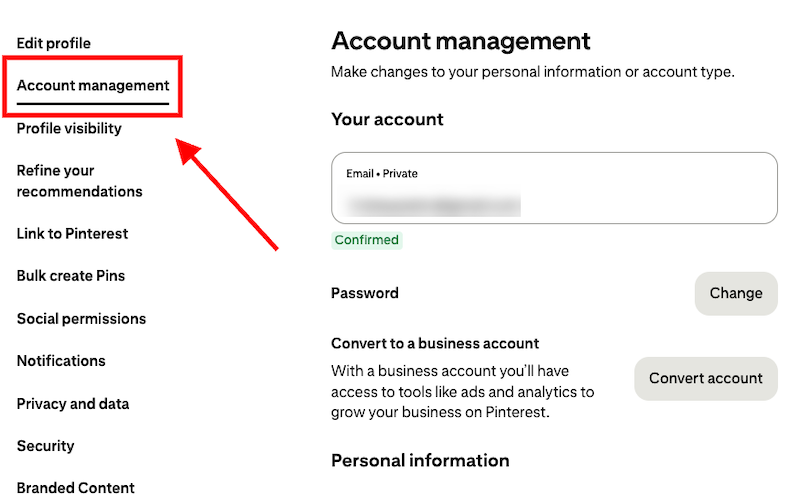
Next, click Account Management from the list of options.
Step 3: Choose to deactivate or delete your account
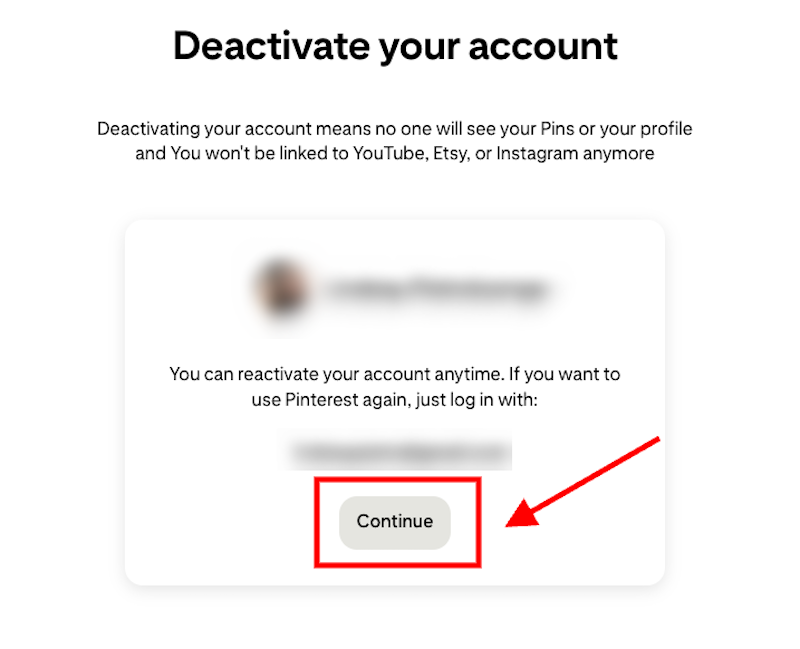
At the bottom of the Account Management page, you’ll see a Deactivation and Deletion section. Choose how you want to remove your account.
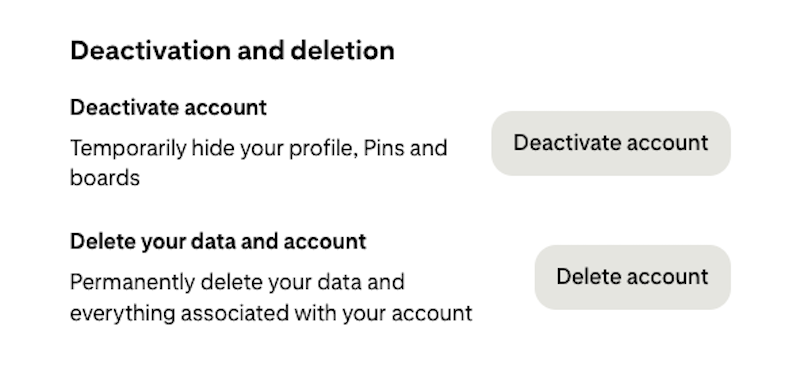
Whichever option you select, click Continue on the next window.
Step 4: Provide a reason for your choice
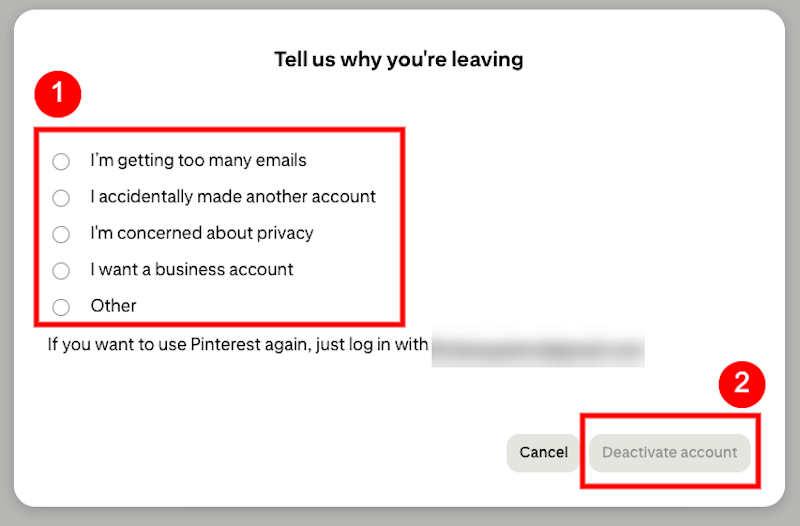
On the next window, provide a reason for deactivating or deleting your account. Depending on which option you’ve chosen, you’ll either click Deactivate Account or Send Email on the bottom right of the window.
(The example below is for deactivation, and the options for deleting your account are similar.)
Step 5: Check your email if you’re deleting your account
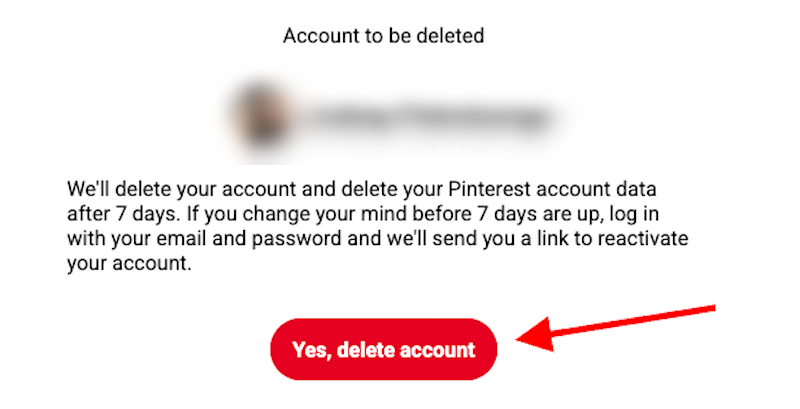
If you’ve chosen to delete your account, Pinterest will log you out immediately and send you a confirmation email. To complete the deletion, click the red “Yes, Delete Account” button in your email.
Can You Remove Someone Else’s Pinterest Account?
If you want to remove someone else’s Pinterest account, you have a couple of options.
Removing a Deceased Person’s Pinterest Account
When you need to delete the Pinterest account of someone who is deceased, you’ll need to contact Pinterest. By providing them with verification (like an obituary), they can delete the account for you. However, you won’t be able to get the individual’s login information.
Reporting an Account
If you want to report an account to Pinterest in the hopes that it’ll be removed from the platform, here’s what to do:
Step 1: Go to the Pinterest account you want to report
Log in to Pinterest and navigate to the account you want removed.
Step 2: Start the reporting process
Click the Three Dots icon at the top of the Pinterest account’s main page.
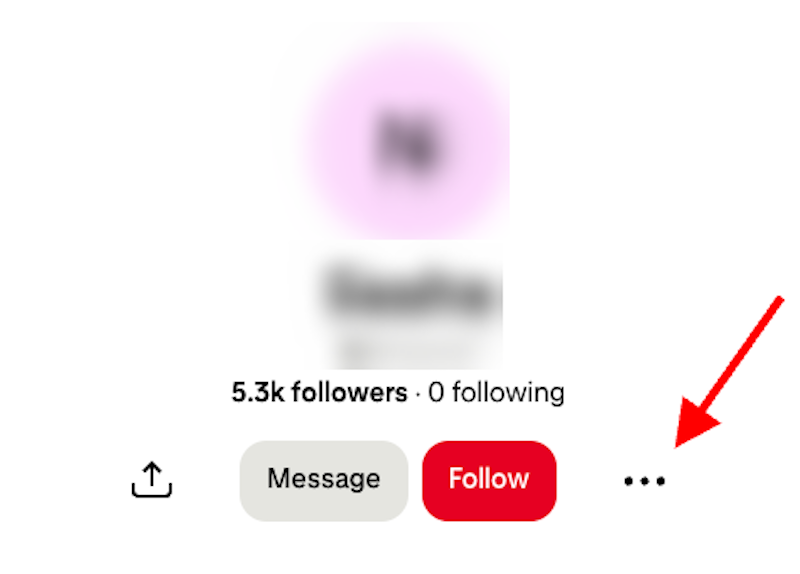
Click Report in the drop-down menu.
Step 3: Select a reason for your report
Next, you’ll need to select a reason for why you’re reporting the account. Options include spam, misinformation, harassment, and more. Once you’ve made your selection, click Next.
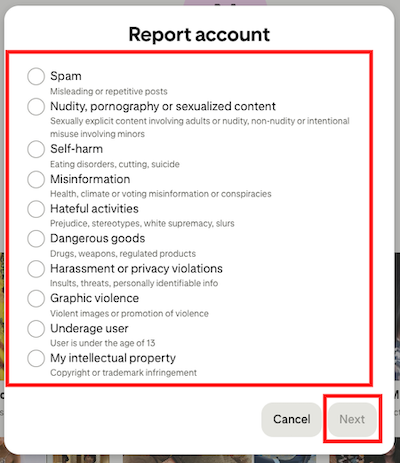
Depending on the reason you choose, you might be asked to provide more information. Continue following the steps Pinterest outlines to finalize your report.
How Deleting Pinterest Impacts Your Online Reputation
Removing your Pinterest account from public access can play an important role in managing and protecting your online reputation. However, it’s important to understand the benefits and drawbacks of taking permanent action.
Removing Outdated or Unprofessional Content
Pinterest profiles can include years of boards and saved Pins that reflect your past aesthetics, interests, opinions and projects. Even if that content was harmless at the time, it may not currently align with your personal or professional image.
Controversial quotes or political content can surface in search results for your name even if it was posted years ago. By removing your account, you remove access to those boards and prevent them from shaping your online narrative.
Protecting Your Personal Pinterest Data

Even if your Pinterest boards seem harmless at first, your activity can reveal quite a lot about you with time. Your saved Pins can point to your home renovations, future travel plans, frequented locations, purchases, and major life events. Together, this information can paint a broad and accurate picture of your life.
By deleting an unused or unnecessary account, you reduce the amount of personal information available about you.
Eliminating Unwanted Search Results
Pinterest has a strong domain authority, which is why it regularly ranks well in search engines. If someone searches for your name online, it’s very possible that your Pinterest account will appear high in search results, even if you haven’t used it in years.
Deleting your account means that those listings will eventually be removed from Google results, too. This helps you take more control over what people find when they look you up online.
This can be especially valuable to business owners, job seekers, or public-facing professionals. And in fact, anyone managing their online footprint will benefit from removing unhelpful search results.
Deleting Doesn’t Immediately Remove Search Engine Results
It’s important to know that even permanently deleting your Pinterest account won’t immediately erase that content from search engines. Google and other search engines cache and index pages, so copies of your Pinterest content can appear even after it’s been deleted.
Most of the time, that content will disappear from search results once the site is re-crawled and the search engine realizes the content no longer exists. This process can take weeks, though, so pursuing other online reputation management strategies in the meantime is key. For example, a content suppression campaign can push negative Pinterest results off the first page while you’re waiting for it to be removed completely.
We work on behalf of our clients to monitor their Pinterest data and remove personal information from the internet. Give us a call at 866-349-0130 to learn more.
Frequently Asked Questions
How do I permanently delete my Pinterest account?
To permanently delete your Pinterest account, log in and navigate to your Account Management section. Tap Delete rather than choosing to deactivate your account. After seven days, your account will be permanently deleted from the platform.
How do I report a Pinterest account for impersonation?
To report a Pinterest account for impersonation, start by going to the account’s main profile page. Click the Three Dots icon, then select Report. When asked why you’re reporting the account, select the most appropriate reason, then go through the next steps to finalize the report.
How do I delete someone’s Pinterest account?
You can’t directly delete another person’s Pinterest account if you don’t have their login credentials. However, depending on the circumstance, you can either contact Pinterest support or submit a report to request removal.
Wrapping Up

Deleting your Pinterest account can be an important step toward protecting your privacy, managing search results and taking control of your online presence. Whether you’re trying to reduce your digital footprint, get rid of an unused account or remove outdated content from search results, deactivating or deleting your Pinterest account can be an excellent tool.
Remember, though: Online reputation management doesn’t end once you delete content from the internet. Search engines can take time to update results, and cached content can linger online for longer than you want it to. Plus, other online profiles may still contain your personal information. And without active monitoring, new information can pop up without you even realizing it.
If you truly want to protect your online identity and improve how you appear to the public, professional support can make the process quicker and more effective. At Internet Privacy, we help individuals monitor their digital footprint, remove personal information, and strengthen their online reputation.
Speak with an expert today at 866-349-0130 and take the next step toward a safer online presence.