How To Complete the Whitepages Opt-Out Process
This Whitepages opt-out guide will help you remove your personal data from the people search website so you can gain more control over your online footprint.
The Whitepages website provides online directory, identity verification, background check, and fraud screening services for businesses and individuals. But as opt-out measures become more popular, the number of records the site holds continues to fall.
Still, Whitepages boasts one of the largest databases of contact information in the U.S. This includes data on everything from public records to property deeds, general contact info, and more.
Millions of people turn to Whitepages every month to locate personal data on someone else. These include names, ages, addresses, and other personal information. That means that if you haven’t already taken steps to opt out of Whitepages, your details are freely accessible to anyone online.
Today, many data broker websites attract criticism for collecting and selling personal info on the web. Accordingly, there’s never been a better time to remove your information from this website and similar ones.
Do you need help removing your personal data from multiple people search websites? Call 866-349-0130 to speak with a content removal expert today.
How To Opt Out of Whitepages
In this section, we’ll walk you through the steps of removing your data from Whitepages.
Step 1: Find Your Whitepages Listing
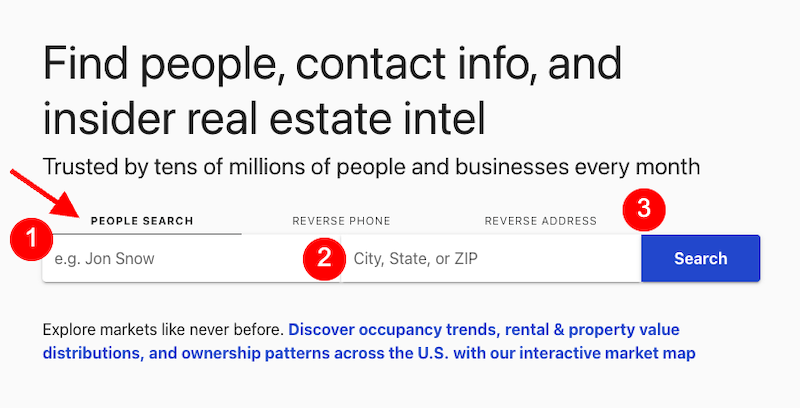
To start the removal process, go to the Whitepages website and use the People Search feature on the homepage to look up your name. Fill in your full name and location (city and state or zip code), then click the blue Search button. You can also search using just your name if you don’t want to input your location info.
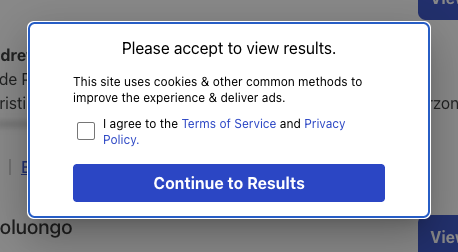
Agree to the Terms of Services and Privacy Policy by ticking the Checkbox and then selecting Continue to Results on the pop-up window.
Skim the results to find your profile. When you’ve found your profile, click View Details. (Note that you don’t want to click View Full Report, as this will bring you to a page where you can get your Whitepages Premium report.)
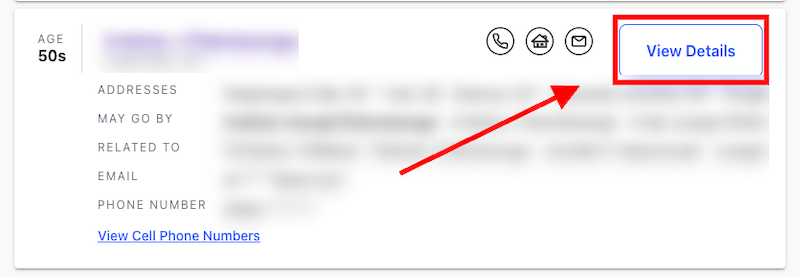
Once you’ve opened up your Whitepages listing, go to the top of the page and copy the URL. Paste the URL to a document, as you’ll need it to complete the opt-out request.
Step 2: Enter Your URL Into the Opt Out of Whitepages Tool
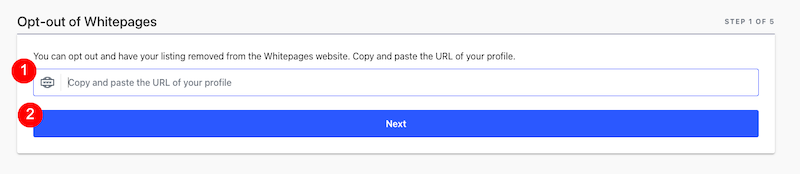
Next, go to the Whitepages opt-out request page here. Note that this page is difficult to find on the website, and the easiest option is to go directly to it at Whitepages.com/Suppression-Requests.
Paste the URL in the dedicated space, then click Next.
Step 3: Confirm Your Personal Details in the Whitepages Opt-Out Form
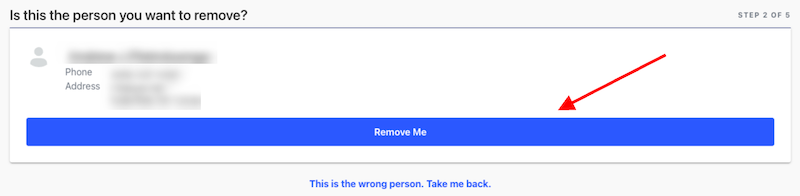
The next page will ask you to confirm that you entered the correct profile. Review the information, then click Remove Me to continue.
Step 4: Explain Why You Want To Opt Out of Whitepages
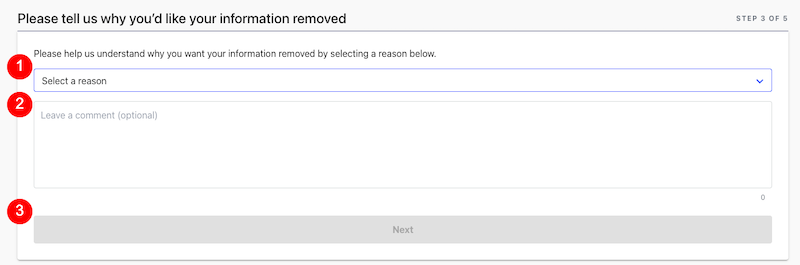
You’ll be asked to provide a reason for requesting removal. From the drop-down menu, make the best choice. Your options are:
- My profile information is incorrect
- I am receiving spam calls and junk mailings
- I am being harassed or stalked by someone
- I just want to keep my information private
Underneath, there’s a box where you can leave a comment to provide Whitepages with additional information. While you have to select a reason from the menu before proceeding, leaving extra notes in the comment section is optional.
When you’re done, click Next.
Step 5: Verify Your Identity
Whitepages requires you to verify your identity via an automated call. Enter your phone number in the dedicated space, then click the Checkbox, followed by the Call Now To Verify button. You don’t need to provide the same phone number that’s listed in your Whitepages profile — you can enter any phone number you want.
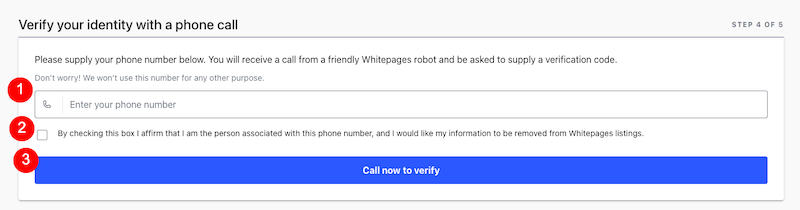
You’ll receive a phone call right away, and you’ll hear a robotic voice say that it’s calling from Whitepages. Then, you’ll be asked to enter a four-digit verification code, which will show on the Whitepages website. Enter the four-digit code to complete the verification. The call will disconnect when you’re finished.

Step 6: Confirm Completion of the Whitepages Opt-Out Form
Once the call ends, the Whitepages page will refresh. A message at the top will say, “Your request to opt out has been accepted. Please note that it may take up to 24 hours for this to reflect on the Whitepages web site.”
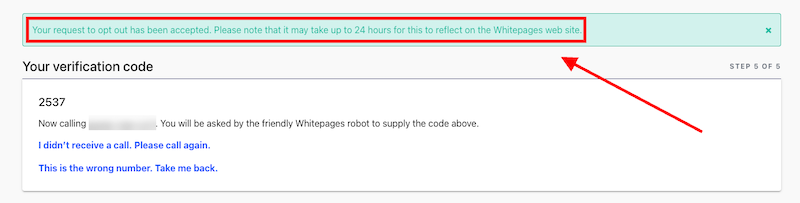
Once you see this message, there isn’t anything left for you to do, other than check back in a couple of days to ensure your profile is no longer showing up in Whitepages search results.
Where Do Data Broker Sites Like Whitepages Get Your Personal Information?
Whitepages collects your personal data from a wide range of public and commercial sources. The database is created by compiling and cross-referencing information from government and public records, third-party data brokers, and a variety of other public sources, such as:
- Business registrations
- Court filings
- Professional licenses
- Property ownership records
- Telecommunications records
- Voter registrations
In addition to that, Whitepages may purchase information from commercial data brokers and marketing databases. This gives Whitepages access to:
- Consumer surveys
- Loyalty programs
- Mailing lists
- Online transactions
- Warranty registrations
There’s even more — Whitepages can round out the information it has about you from your social media and other types of online profiles.
What Should You Do After You Opt Out of Whitepages?

Removing your data from Whitepages is a good start, but there are several people search sites out there that will continue to store and show your information to users. Common sites to check for your personal information are Spokeo, BeenVerified, Radaris, MyLife, PeopleFinders, CheckPeople, and Intelius.
- Spokeo allows people to look up your home address from any username you’ve used in the past. Thankfully, the Spokeo opt-out process is relatively straightforward.
- BeenVerified provides people search services and criminal background checks on its website and mobile app.
- Instant Checkmate is a predominantly background check-focused service. It uses criminal records and other information to create listings for its website. Be sure to opt out here as well.
Ultimately, all of these sites operate in a similar fashion, and it’s smart to remove your information from all of them, if possible.
Restore Your Online Privacy With Our Data Removal Service

Whether you’re concerned about listings on Whitepages and need help with opting out or you have larger questions about your online privacy, we’re here to help.
At InternetPrivacy.com, we’re experts in online safety and reputation management. We work with people who need to take back control of their personal or professional brand online.
Contact us today at 866-349-0130 to speak with an expert.